
AFFiNE

AFFiNE self-hosted: what it does and how to run it
AFFiNE puts docs, whiteboards and databases in one workspace, a self-hosted alternative to Notion and Miro. See what it does, then run it on Zenith in a few minutes with email and AI already working, or set it up yourself with Docker Compose.
· $20 a month on Zenith · 30 GB for files · Email and AI already working
Deploy with ZenithThe short version
Host it on Zenith if
- You want AFFiNE on its own HTTPS address in a few minutes, with no server, reverse proxy or certificates.
- You don't want to look after PostgreSQL, Redis, database migrations, updates and backups.
- You want email invitations and AFFiNE AI to work without your own mail server or AI key.
Run it yourself if
- You already run a server with Docker and want AFFiNE next to your other apps.
- You want to decide exactly when AFFiNE upgrades.
AFFiNE is a workspace where docs, whiteboards and databases live together, so a rough sketch and the plan it turns into stay in one place. You can self-host it with Docker Compose, or run it on Zenith for $20 a month. Zenith gives you your own AFFiNE on an HTTPS address, with its database, email and AI already connected, and no server to look after.
What AFFiNE does
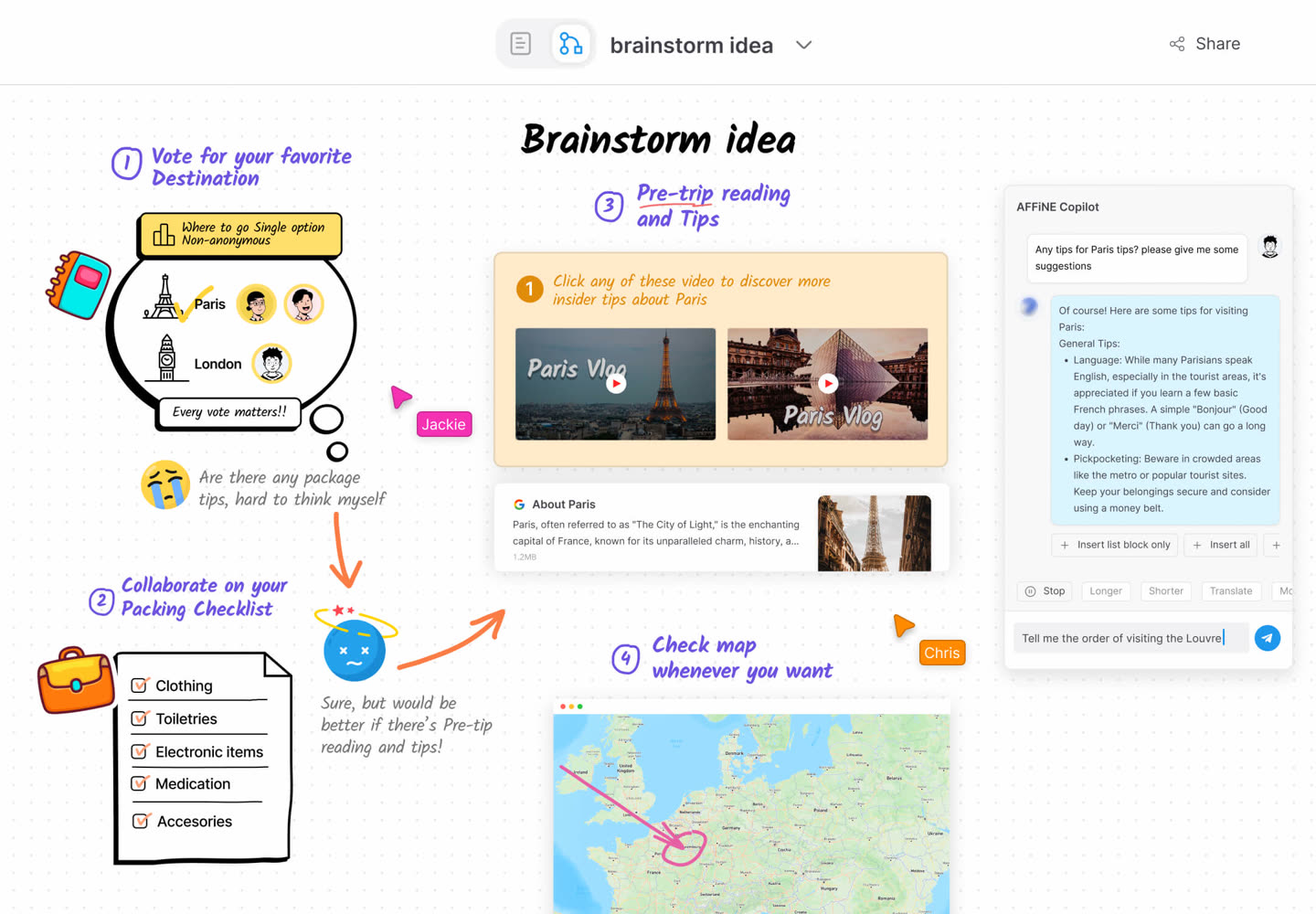
- One doc, two views. Write in page mode, then switch the same doc to edgeless mode and lay it out on an infinite canvas with shapes, sticky notes, connectors and drawings. Nothing gets copied between tools.
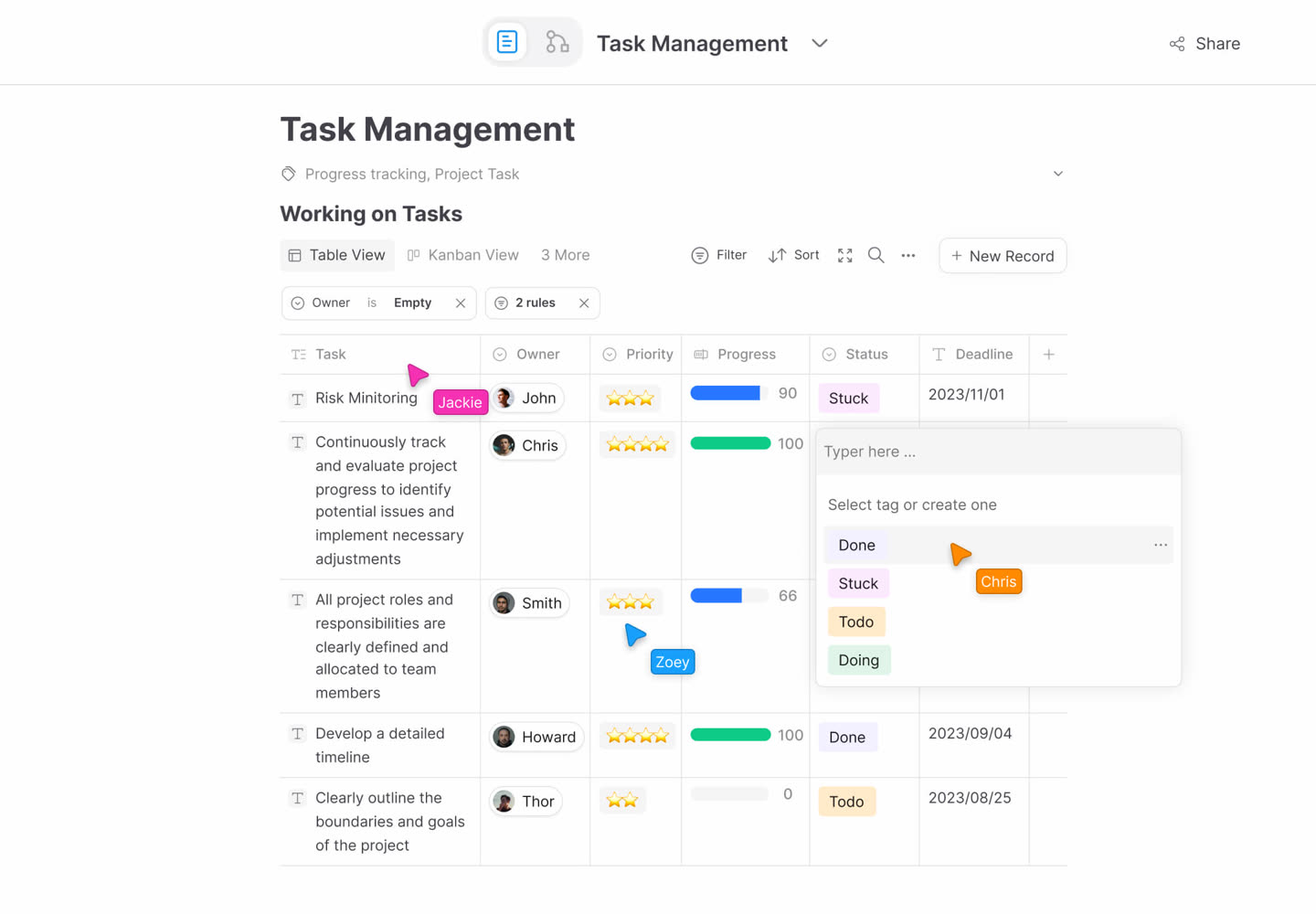
- Databases inside your docs. Track tasks, reading lists or projects in a table, then switch the same rows to a kanban board.
- Write together. Your team edits the same doc at once and sees each other's cursors as they type.
- AFFiNE AI. Ask questions, draft text, and summarise or rewrite what you've written, from the side panel or right in the doc.
- Daily journal. A page for each day, with a template you choose, for notes, logs and meeting minutes.
- Bring your notes with you. Import a Notion export, Markdown files or Word documents.
AFFiNE vs Notion
AFFiNE works much like Notion for writing, and adds the whiteboard you'd otherwise use Miro for. The big difference is where it runs. Notion only runs on Notion's servers. AFFiNE can run on a server you choose, so your team's notes, diagrams and project data sit in your own instance.
Like Notion
- Type / to add any kind of block
- Databases with table and kanban views
- Several people editing at once
- Daily journal pages and templates
- Import from a Notion HTML export
Not in AFFiNE today
- Notion's wide range of integrations
- SAML sign-in and SCIM provisioning, which AFFiNE says it doesn't support yet
Two ways to run AFFiNE
| On your own server | On Zenith | |
|---|---|---|
| Server | Rent one and install Docker | Included |
| Database | PostgreSQL with pgvector, Redis and a migration job | Included, with 20 GB for the database |
| Domain and HTTPS | Point a domain, run a reverse proxy, set externalUrl | Your own HTTPS address, or your own domain |
| Add SMTP settings so invitations go out | Included | |
| AI | Get a provider key and set up AFFiNE AI | Connected to Zenith's AI, no key needed |
| Files | Uploads on your own disk | 30 GB for uploads |
| Updates and backups | Pull, restart and back up the folders yourself | Updates included. Managed backups, best effort |
Hosted AFFiNE in a few minutes
$20 a month with PostgreSQL, Redis, email and AI already set up, on its own HTTPS address. 30 GB for files.
Run AFFiNE on Zenith
- 1
Deploy and pick an address
Open AFFiNE in the catalogue and click Deploy now. After paying, pick a name and click Use this address. Your AFFiNE lives at that name, a hyphen and your username, ending in
.zh.run. If you don't have a Zenith account yet, you create one after paying. - 2
Sign in as the admin
When AFFiNE is live, open it and sign in with your Zenith email and the admin password shown under Your credentials. It's also in the Credentials tab of your dashboard.
- 3
Invite your team
Create a workspace and invite people by email. Zenith sends the invitations, so there's no mail server to set up.
Self-host AFFiNE with Docker
AFFiNE's docs ask for at least 4 CPU cores and 2 GB of RAM, plus Docker with Compose v2. To use it away from that machine, you also need a domain and HTTPS in front of port 3010.
- 1
Download the official files
Both files come from AFFiNE's latest GitHub release.
mkdir affine cd affine mkdir -p config curl -L -o docker-compose.yml \ https://github.com/toeverything/AFFiNE/releases/latest/download/docker-compose.yml curl -L -o config/config.json \ https://github.com/toeverything/AFFiNE/releases/latest/download/config.json.example - 2
Set your address and start
In
config/config.json, setserver.externalUrlto the address people will use. For a public server, use the final HTTPS address. Then start AFFiNE, PostgreSQL and Redis."server": { "name": "AFFiNE Self-hosted", "externalUrl": "https://affine.example.com" }docker compose up -d docker compose ps - 3
Add HTTPS and create the admin
Put a reverse proxy in front of port 3010. With Caddy on the same server, this
Caddyfilegets a certificate and passes traffic through. Then open/adminon your address and create the first admin account.affine.example.com { reverse_proxy 127.0.0.1:3010 }
AFFiNE keeps its database in ./data/postgres, uploads in ./data/storage and settings in ./config. Back up ./data and ./config together. To update, run docker compose pull and docker compose up -d, and the migration job runs again before the server starts.
Use the AFFiNE desktop app
AFFiNE Desktop works with a self-hosted server, whether you run it or Zenith does. Open the workspace list in the top left, choose Add Server, enter your AFFiNE address and sign in.
Self-hosted AFFiNE limits
These come from AFFiNE's licence, so they apply on your own server and on Zenith alike. AFFiNE's basic self-hosted plan allows up to 10 seats per workspace, with community support. Larger teams need AFFiNE's Self-host Team plan, at $10 per seat a month billed yearly, or $12 billed monthly. AFFiNE also says it doesn't support SAML sign-in, SCIM provisioning, built-in audit logs or an official Kubernetes setup today.
Need AFFiNE on your company's own servers instead? Zenith Enterprise runs apps on your infrastructure or ours, with named engineers who handle the deployment.
Common questions
- What is AFFiNE?
- AFFiNE is a workspace for docs, whiteboards and databases. Any doc can switch between a page and an infinite canvas, so notes, diagrams and task tables live together. People use it as an alternative to Notion for writing and to Miro for visual planning.
- Is AFFiNE better than Notion?
- It depends on what you need. AFFiNE gives you docs, databases and a whiteboard in one tool, and you can host it yourself, so the workspace lives on a server you choose. Notion has a larger set of integrations. AFFiNE says it doesn't support SAML, SCIM or built-in audit logs yet.
- Can I import my Notion workspace into AFFiNE?
- Yes. Export your Notion workspace as HTML with subpages, then use Import in AFFiNE and choose Notion. AFFiNE also imports Markdown, Markdown with media in a zip, and Word .docx files.
- What is the AFFiNE Docker image?
- ghcr.io/toeverything/affine. AFFiNE's official compose file runs it twice, once as the server and once as a migration job before each start, next to PostgreSQL with pgvector and Redis.
- Does self-hosted AFFiNE need a .env file?
- Not for new installs, according to AFFiNE's docs. Settings go in config/config.json, starting with server.externalUrl.
- Can the AFFiNE desktop app connect to a self-hosted server?
- Yes. In AFFiNE Desktop, open the workspace list in the top left, choose Add Server, enter your server's address and sign in. This works for an AFFiNE you run yourself and for one on Zenith.
- How many people can use self-hosted AFFiNE?
- AFFiNE's self-host page says its basic plan allows up to 10 seats per workspace. Its Self-host Team plan adds seats for $10 per seat a month billed yearly, or $12 billed monthly. That is AFFiNE's own licence, so it applies on Zenith too.
- Does self-hosted AFFiNE include AI?
- AFFiNE AI is optional, and on your own server it needs your own AI provider keys. On Zenith it is connected to Zenith's AI, so you don't need a key.